Stop paying for pictures of your own words
TrimDown turns a Word file, a PDF or a web page into clean Markdown on your Mac — up to 90% fewer tokens, measured — and turns your AI's answer back into a finished Word document in your own template. Any model. Any document. One purchase.

Markdown to Word for AI work - and Word, PDF and web pages to Markdown
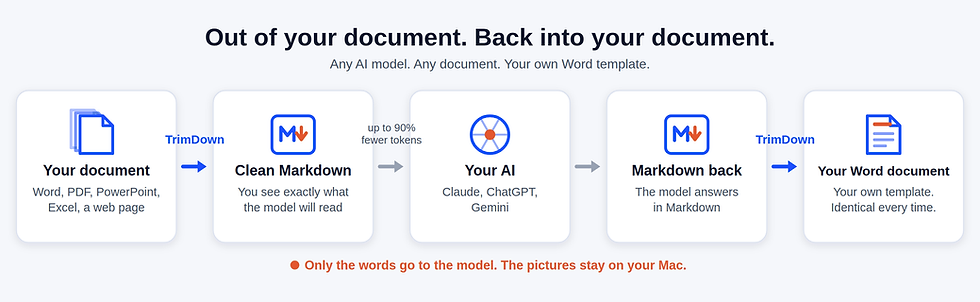
Getting your PDF or Word file into Markdown is only half the job. The other half is giving the document back. TrimDown takes your Word file, your PDF or a web page in, shows you the Markdown before you spend a single token, and then builds the model's answer back into a finished Word document: your fonts, your headings, your header and footer, your logo. Out and back, on your Mac, every time.
The Problem
Send a PDF or a Word file to an AI model and it does not arrive as text. It arrives as pictures of the pages, with the text alongside it. You pay for the same page twice, on every single turn of the conversation — and those pictures fill the context window, so the model starts forgetting the beginning of your document while you are still talking about it. Then it hands you back Markdown, and you spend twenty minutes making it look like a document again.
See what your model actually reads.
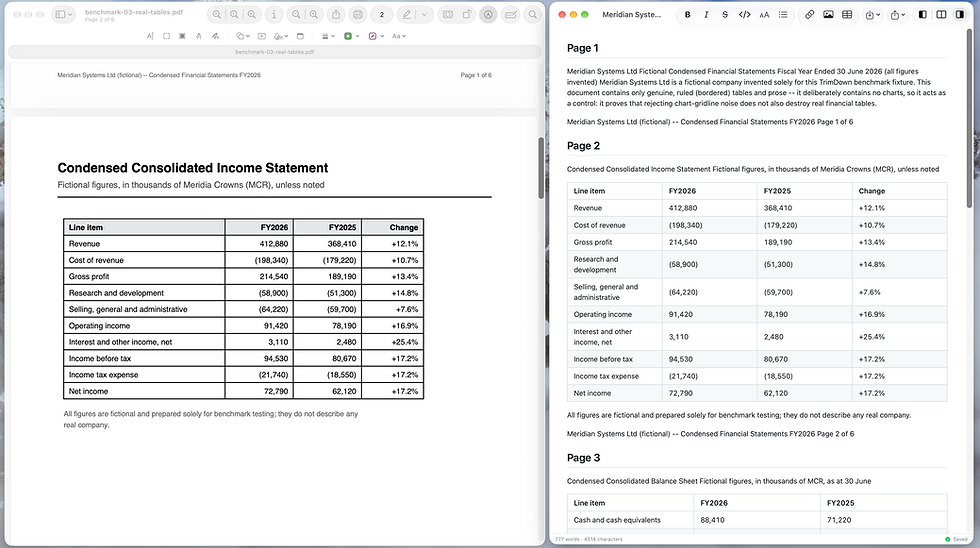
A PDF is billed twice over, once as a picture of every page and once as the text scraped out of it. TrimDown shows you the Markdown instead, so you can check and correct exactly what the model receives before you spend a token on it.
The pictures stay on your Mac. Only the words go to the model.

How TrimDown does it
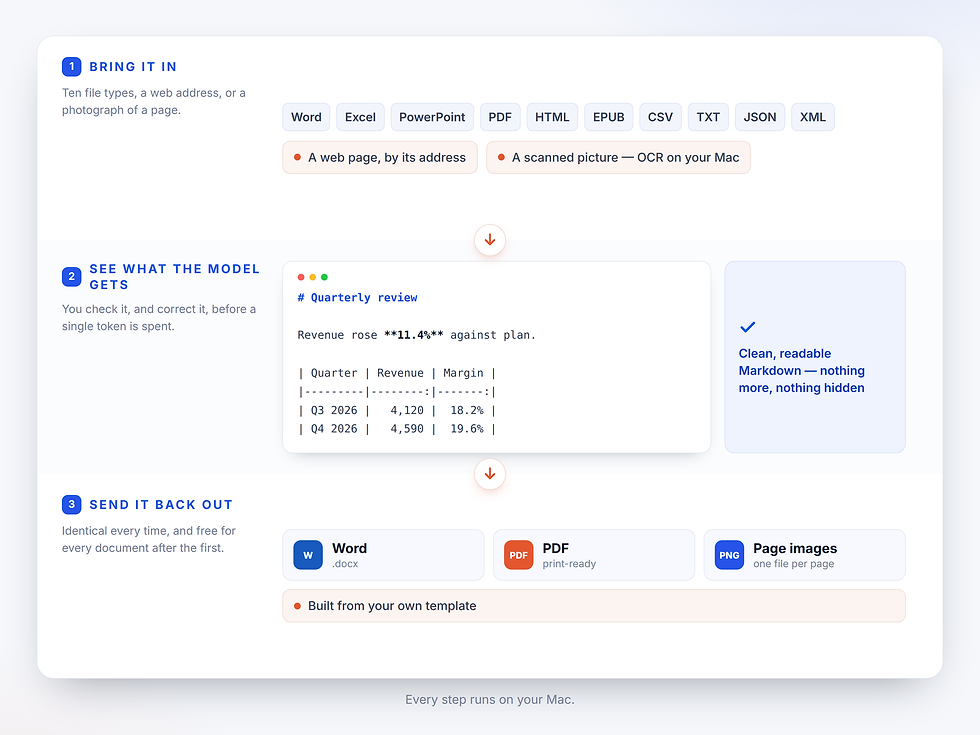
Import a Word file, an Excel sheet, a PowerPoint deck, a PDF, an HTML page, an EPUB, a CSV, TXT, JSON or XML file. Import a web page by its address. Import a scanned picture and on-device OCR reads the text out of it. What comes out is clean, readable Markdown that you can check before you send it — nothing more, and nothing hidden. What goes back out is a PDF, or page images, or a Word document, built from your own template, identical every time and free for every document after the first.
The Proof
We did not estimate any of this. We wrote TrimDown's own product specification — about 3,000 words and 22 screenshots of the application — converted it with TrimDown, and counted both versions with Anthropic's Token Counting API. On disk the same document is 11 megabytes as a PDF and 19 kilobytes as Markdown. Here is every document we measured, including the ones that make us look worst.
Claude Haiku 4.5 saves even more, without exception.
Check our full description of the testing, and get the files and script to run some of the tests yourself in our Token Benchmarks page.


Consultants and analysts
The deliverable is the document. A report that arrives in the wrong font is the one the client remembers for the wrong reason.
Who is this for
Someone always asks for a Word file. Not a PDF, not Markdown. A .dotx that looks like your other documents.

Anyone who reformats AI output by hand
Copy into Word. Watch the formatting break. Spend twenty minutes putting it right. Do it again tomorrow. TrimDown is those twenty minutes saved, every time.
Anyone with documents they would rather not upload
A client contract, a draft under NDA, a report full of photographs. TrimDown converts it on your Mac. Only the words go to the model, and the pictures stay behind — then go back into the Word document at the end.
How it works
1
2
3
Convert in
Use TrimDown to convert PDF, Word and the rest to Markdown, and cut the input bill by up to 90%. See exactly what is sent to the AI engine before you send it.
Ask your AI
Ask your AI to output Markdown with Mermaid for charts and graphs.
Convert out
Use TrimDown to convert back to Word with your own style, logo, etc. (or PDF, PNG, etc.).
What you get back
-
The finished Word file in the template you chose.
-
The pictures and diagrams inside it.
-
The same result every time.
Your client's template. Not ours.
Point TrimDown at your own Word template once. Every document after that comes out in it — the same fonts, the same heading colours, the same header and footer, the same numbering. The two documents below are the same Markdown, exported twice, through two different clients' templates. Nothing in the text changed.

One Markdown file. Two clients' templates. Identical words.
What's in the box
One app. One purchase. No subscription, no account, nothing to install alongside it.
See what the model will read
Word export, in your own template
Charts as diagrams,and they survive the export
Markdown on one side, the rendered document on the other, synchronized. Correct it before you send it, not after the answer comes back wrong.
Choose your .dotx once. Every export after that carries your styles, your header and footer and your logo, identical every time, and free for every document after the first.
Ask your model for a chart as a Mermaid diagram instead of a picture of one. TrimDown draws it in the live preview while you write. One chart costs about 71 tokens as a Mermaid diagram against about 646 as a page image — and the model can read the values, which it cannot do from a picture.


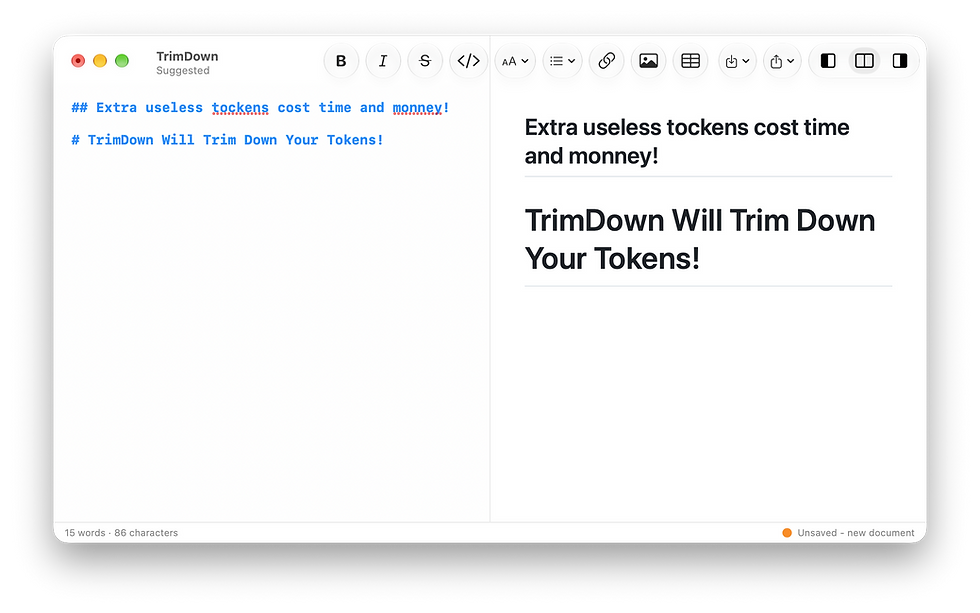
Spell check as you type
The macOS spell checker, in the languages your Mac already has, inside the editor.
Imports what you actually get sent
Word, PDF, PowerPoint, Excel, HTML, EPUB, CSV, TXT, JSON and XML — and a web page by its address. A scanned page is read by on-device OCR, on your Mac.
MacOS Native
Written in Swift and sandboxed. No Python, no command-line tools, no setup script. It is one app from the Mac App Store and it runs on your Mac.