How to turn a ChatGPT or Claude answer into a finished Word document, in your own template
Your AI writes the answer. You still have to send a Word file that looks like your other documents. Here is how to get from one to the other in three steps, on your Mac.

ChatGPT to Word and Claude to Word, in your own template
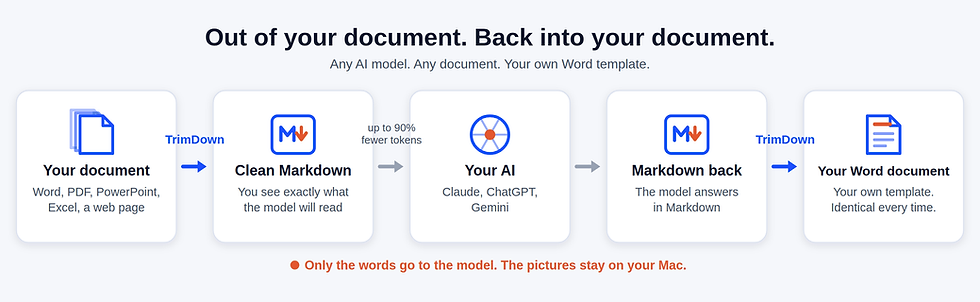
The answer your AI writes is already Markdown: the plain text behind every heading, list and table it shows you. TrimDown reads that Markdown and writes a real .docx from it, in your own template. If you start from a client's file, TrimDown also does the first half: it turns the Word file, the PDF or the web page into clean Markdown to send to the model. Out and back, on your Mac, every time.
Copy, paste, reformat. Every time.
You ask ChatGPT or Claude for a report, a memo or a proposal. The answer is good. Then you paste it into Word. The headings come out as bold lines, the tables lose their columns, the chart is a picture you cannot edit, and none of it is in your client's template. You spend twenty minutes putting it right. Tomorrow you do it again.
TrimDown is those twenty minutes saved, every time.
ChatGPT to Word, Claude to Word: three steps
1
2
3
Start clean
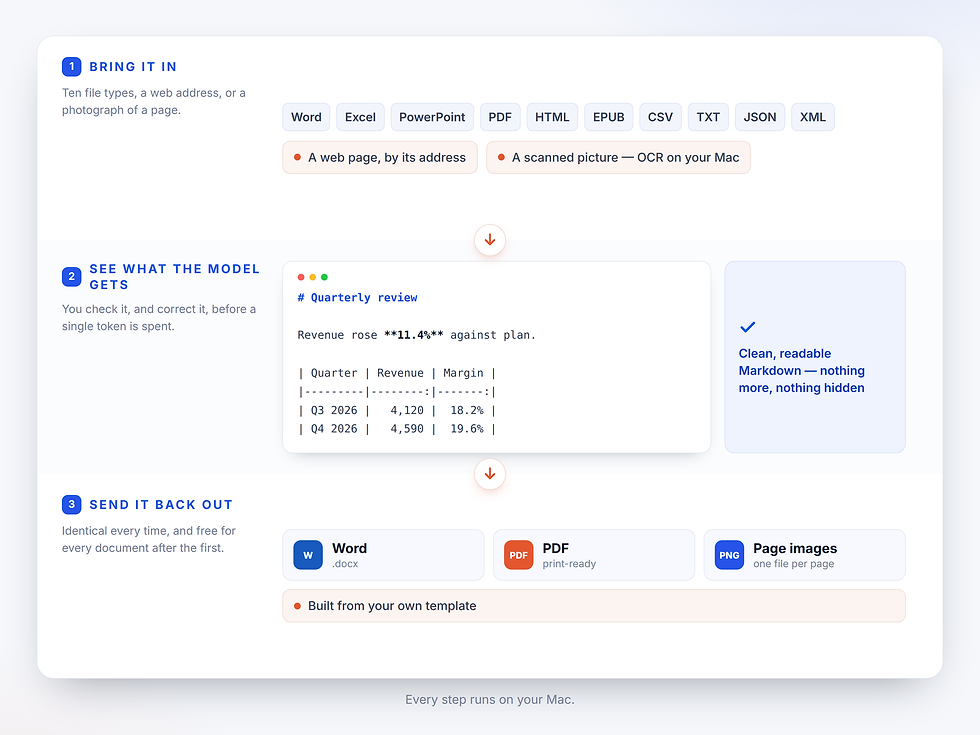
Optional. In TrimDown, choose Convert > Import File as Markdown and open the client's Word file, PDF or web page. Check the Markdown and copy it into ChatGPT or Claude. The model reads the words, not pictures of the pages: up to 90% fewer tokens, measured.
It works the same in ChatGPT and in Claude. Add this line to your request: "Write the answer in Markdown in one code block. Use # headings, Markdown tables and lists. Draw any chart as a Mermaid diagram." Then click the copy button on the code block.
Ask for Markdown
Export to Word
Paste the answer into TrimDown and check it in the live preview. Choose Convert > Export as Word (.docx). Your document comes out in your own template, ready to send.
Your client's template. Not ours.
Choose your template once, in TrimDown's Settings > Word Export. A .docx or a .dotx both work. Every export after that takes its fonts, headings, colours, margins, header, footer and logo from it. Below: the same Markdown, exported through two clients' templates.

One Markdown file. Two clients' templates. Identical words.
What you get back
-
Headings, numbered and bulleted lists, and real Word tables.
-
Footnotes as Word footnotes.
-
Pictures and Mermaid diagrams inside the file.
-
Right-to-left text and tables, mirrored the way Word expects.
-
The same result every time, for every document.
Works with the AI you already use
ChatGPT, Claude, Gemini, an agent, a coding tool or a model on your own Mac: if it can write Markdown, TrimDown can make it a Word document. And the same app makes the input smaller: it turns Word, PDF, PowerPoint, Excel and web pages into clean Markdown, so the model reads the words, not pictures of the pages. No plug-in, no account, no plan to upgrade.
Does my document leave my Mac?
No. TrimDown converts and exports on your Mac. Only what you choose to paste into your model goes to it.
Questions
Short answers before you download.
Do I need a Word template?
No. Without one, TrimDown exports with clean default styling. Add your template when you want the document to look like your others.
What does it cost?
30 days to test free, one charge to buy: US$ 29.99. No subscription, no account. Needs macOS 13 (Ventura) or later.